Less repetition
Before
800,787 tokens. Earlier turns, tool output, and repeated file context.
After
14,857 tokens. Summary kept. Recent turns still sent.
 CodeCook
by Makayis
Install CodeCook
CodeCook
by Makayis
Install CodeCook
A powerful coding add-on for VS Code.
Bring your own key and build with bigger models, without the token anxiety.
Why I built CodeCook
Long chats resend everything you already paid for: every old message and every tool output, on every turn. The bill keeps growing even when the work doesn’t.
CodeCook summarizes the older turns, keeps your plan in reach, and shows what each turn will cost.
After CodeCook’s smart compression, 800,787 tokens became 14,857.
Features
Before
800,787 tokens. Earlier turns, tool output, and repeated file context.
After
14,857 tokens. Summary kept. Recent turns still sent.
plan.md
Auth stays on the existing provider.
Responses follow the current schema.
Keep the existing database tables.
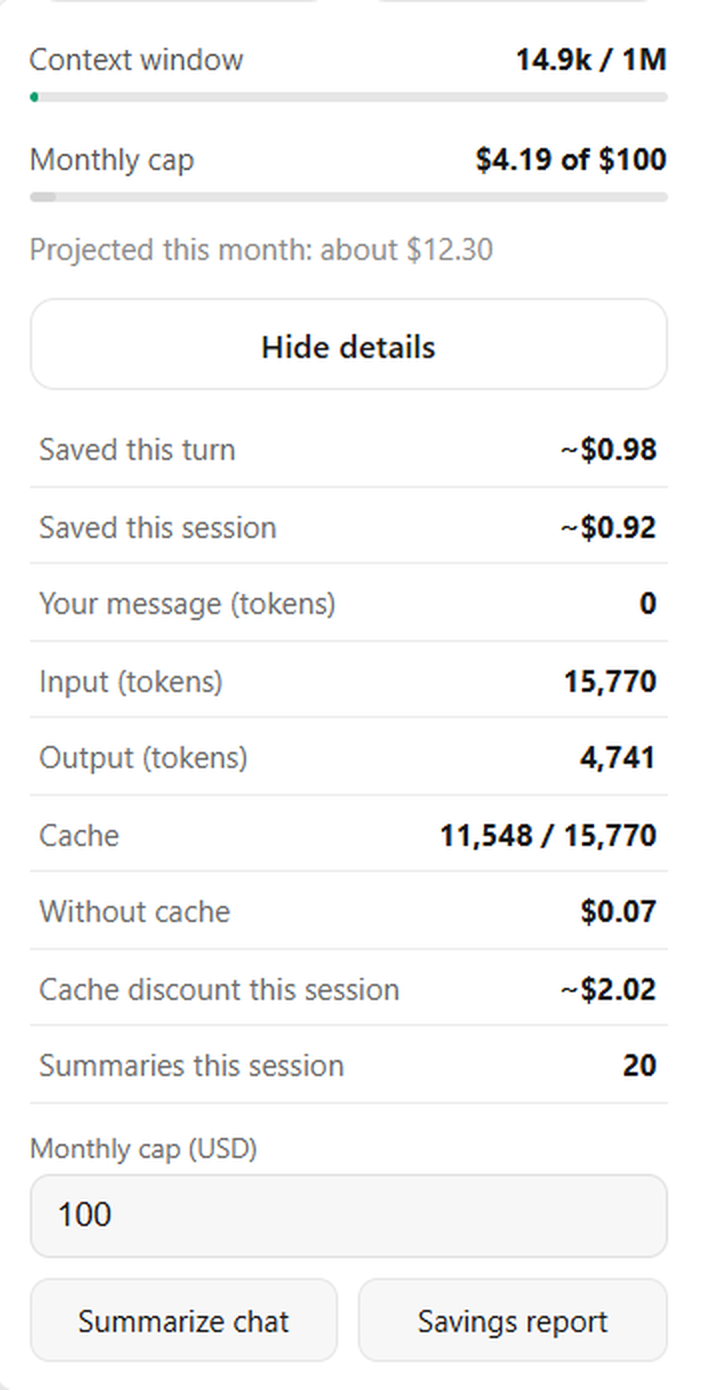
Every turn shows what was sent, what was saved, and where your month stands.
Every change shows as a diff before you accept it.
− sendFullHistory();
+ sendCompactHistory();
Control
Claude, GPT, Google Cloud, AWS, or Azure. Stored on this machine.
Token fields and spend caps are estimates, not the provider bill.
Open it, keep the turn, or revert it.
Who it’s for
01
Spend less time re-explaining a client project and more time delivering the work.
02
Keep building without managing a long conversation by hand every time the context grows.
03
Give the team a shared way to see estimated usage and review the diff before it stays.
FAQ
No. You bring a key for a supported provider. Model usage and charges depend on that account, the model, and the configuration.
You can select a supported model on the provider you connect. Availability, limits, and price stay with that provider. Summarizing older chat is meant to leave more of the prompt for the current work. It does not change what the provider allows.
Summarize chat compresses older history, and later turns can send that summary instead of the full earlier text. The token panel compares history-if-full with history sent. The reduction depends on the conversation, the model, and when you summarize.
A summary can leave details out. CodeCook keeps the recent turns and a plan you can reopen. Read the diff before you keep the change.
Yes. With your own key, you pay that provider. Check their current prices and usage records. Figures inside CodeCook are estimates.
It runs in VS Code 1.85 or newer, Cursor, and Antigravity. The key form supports Google, ChatGPT, Claude, Azure OpenAI, and AWS. It is not a plug-in for every AI coding product.
Provider keys are stored in VS Code Secret Storage on this machine. CodeCook does not run a Makayis backend for those keys. A turn sends the key to the provider you selected. Google sign-in sends the desktop client secret to Google when exchanging the token. This marketing site uses Firebase Analytics, which is separate from the extension. Details are on the privacy page.
Open the extension folder, install dependencies, compile, and press F5. Sign in, then paste a key for a supported provider. The steps are in Install CodeCook.
Summarize the old chat. Keep the plan. Read the diff.
Install
There is no Marketplace listing yet. These steps launch an Extension Development Host.
From the extension folder, on VS Code 1.85 or newer.
The CodeCook icon sits on the activity bar in the Extension Development Host.
Google or GitHub in the sidebar. Then connect Claude, GPT, Google Cloud, AWS, or Azure.
npm install
npm run compile